Not Enough Crashes: The Mod That Stops Minecraft Crashing to Desktop
- Minecraft version tested: 1.21.11
- Supported version range: 1.16.5 – 1.21.11
- Mod version: 4.4.9
Minecraft version tested: 1.21.11
Supported version range: 1.16.5 – 1.21.11
Not Enough Crashes is a Minecraft mod that changes what happens when the game hits a fatal error. Instead of simply closing the client, it intercepts the crash, shows an informative screen listing the mods involved, and sends the player back to the main menu. That means no more relaunching the launcher after every single crash.
Crash Behavior
When a crash happens during gameplay, the mod intercepts it and shows its own screen instead of letting the client close. This screen displays:
- a list of the mods that appear in the error's call stack — each one is a clickable link to its issue tracker;
- the full error report with syntax highlighting;
- a button to upload the report to a service that displays the log in a clean, structured format.
a list of the mods that appear in the error's call stack — each one is a clickable link to its issue tracker;
the full error report with syntax highlighting;
a button to upload the report to a service that displays the log in a clean, structured format.
After reviewing the screen, the player clicks the return button and lands back on the main menu without restarting anything. The session is preserved and the launcher stays open.
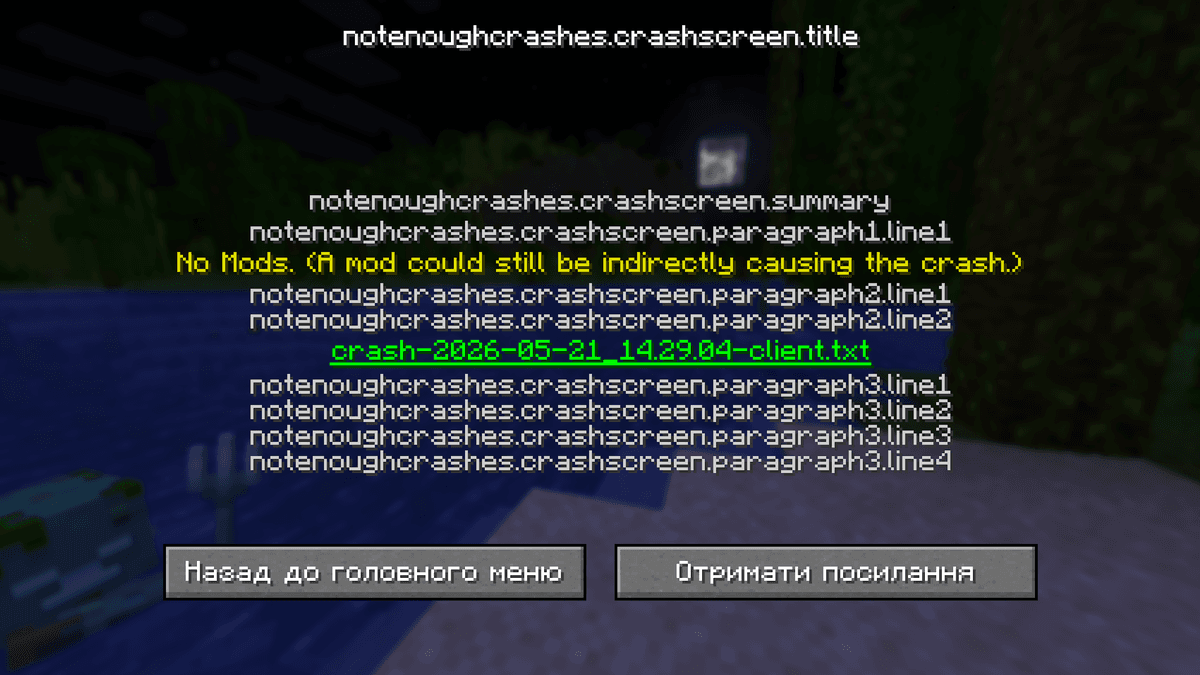
The Not Enough Crashes crash screen
Identifying the Responsible Mod
Not Enough Crashes analyzes the call stack and works out which mods applied mixins to the classes that show up in the trace. This narrows down the suspects: instead of a full log with dozens of lines, the player gets a specific shortlist of candidates for the cause of the crash.
For crashes related to structure and biome generation, the mod adds extra information to the report, which makes it easier to find the mod that broke chunk generation.
Configuration
The configuration file is located at .minecraft/config. It can be edited.
| Setting | What it does |
| catchGameloop | true — the mod intercepts crashes during the main game loop and returns to the main menu. false — crashes during gameplay are not intercepted, and the client closes normally. |
| catchInitializationCrashes | true — intercepts crashes during the game's initialization stage (loading mods and resources). false — such crashes are not intercepted and the game closes. |
| disableReturnToMainMenu | false — after a crash is intercepted, a return-to-main-menu button appears. true — the return button is missing; the crash screen is shown, but you can't return to the game. |
| crashLimit | The maximum number of crashes the mod will intercept in a row. Once the limit is reached (20 by default), the mod stops intercepting and lets the client close normally. Protection against an infinite crash loop. |
| debugModIdentification | false — standard mode. true — extended information about the mod-identification process is written to the log. Only needed for debugging unusual situations. |
true — the mod intercepts crashes during the main game loop and returns to the main menu. false — crashes during gameplay are not intercepted, and the client closes normally.
catchInitializationCrashes
true — intercepts crashes during the game's initialization stage (loading mods and resources). false — such crashes are not intercepted and the game closes.
disableReturnToMainMenu
false — after a crash is intercepted, a return-to-main-menu button appears. true — the return button is missing; the crash screen is shown, but you can't return to the game.
The maximum number of crashes the mod will intercept in a row. Once the limit is reached (20 by default), the mod stops intercepting and lets the client close normally. Protection against an infinite crash loop.
debugModIdentification
false — standard mode. true — extended information about the mod-identification process is written to the log. Only needed for debugging unusual situations.
Conclusion
Not Enough Crashes turns a hard client shutdown into a managed crash screen with useful information and a way back into the game. For large modpacks where crashes happen regularly, it saves time on restarts and makes it much easier to pin down the problem mod. For a single-player vanilla game with no mods, there's little need for Not Enough Crashes; it's best suited to builds with 30+ mods, where crashes are a normal part of development or active testing.
Installation
A typical installation takes about 5 minutes. The flow is the same; only the loader and the matching build differ.
- Install a mod loader (Forge, Fabric or NeoForge) that matches your Minecraft version.
- Download the mod file (.jar) built for that same version.
- Place the .jar into your .minecraft/mods folder.
- Launch Minecraft with the modded profile and check the mod loads in-game.